
This guide explains when ASUS Zenfone Flash Tool is appropriate, its limitations on modern Zenfone devices, and a safe, high-level flashing workflow for supported legacy models, without promising any bootloader, FRP, or security bypass.
Who This Guide Is For
Use this guide only if all of the following apply:
- ✔ Your device is an ASUS Zenfone smartphone from a generation documented to support Zenfone Flash Tool
- ✔ The firmware package is explicitly documented for ASUS Zenfone Flash Tool or a matching ASUS flashing utility
- ✔ Your Zenfone model supports recovery-based or ADB-assisted flashing as part of ASUS’s update mechanism
- ✔ You understand that flashing will erase user data and may brick the device if misused
Do NOT use ASUS Zenfone Flash Tool if:
- ❌ Your Zenfone model is designed for Fastboot-only flashing or uses ASUS Flash Tool (AFT) in fastboot mode
- ❌ The firmware documentation references Fastboot, ADB sideload only, or a different ASUS/OEM method
- ❌ Your device uses a newer ASUS flashing ecosystem not supported by this tool
- ❌ You are attempting to bypass bootloader locks, FRP, account protection, or OEM security
Important: Being an “ASUS Zenfone” alone does not guarantee compatibility with Zenfone Flash Tool. Always follow the method specified for your exact model.
Flashing Disclaimer
Flashing firmware always carries risk. FlashGuideHub is not responsible for data loss, device malfunction, or permanent hardware damage caused by incompatible firmware, incorrect drivers, or unsupported flashing methods.
Before proceeding, always verify:
- Exact Zenfone model and hardware variant
- Correct firmware region and build for your device
- Confirmed Zenfone Flash Tool support from ASUS or trusted firmware documentation
For full details, read our Flashing Disclaimer.
Understanding ASUS Zenfone Flash Tool Limitations
Before using this tool, understand these constraints:
- ASUS Zenfone Flash Tool is not used across all Zenfone generations; many newer devices no longer support it
- Newer Zenfone models often rely on Fastboot-based flashing (sometimes via ASUS Flash Tool/AFT) instead of this legacy utility
- Firmware packages must be specifically built and documented for this tool or its exact workflow
- Recovery-based flashing flows and on‑device menus vary by Zenfone model and Android version
- Timing-dependent key combinations to enter recovery/download modes are model-specific
Using this tool on unsupported Zenfone models can result in a soft or hard brick, especially if the firmware or bootloader is not designed for it.
What ASUS Zenfone Flash Tool Actually Does
The ASUS Zenfone Flash Tool acts as a firmware loader and coordinator between the PC and the phone, typically managing:
- Basic firmware validation and compatibility checks
- Device reboot into a vendor-specific recovery or download state
- ADB-assisted firmware transfer and sideload, where supported
- Controlled flashing via ASUS recovery or internal update mechanisms
On certain models, the device may reboot mid-process and require user interaction in recovery mode, such as choosing “Apply update from ADB” before the PC tool resumes.
Recovery Mode & ADB Interaction (Critical Concept)
Some supported Zenfone models require recovery and ADB interaction as part of the Zenfone Flash Tool flow:
- Booting into ASUS Recovery Mode using the correct key combination
- Selecting Apply update from ADB or a similar option
- Allowing the PC tool to push and apply the firmware
Important notes:
- Recovery key combinations and menu options differ by Zenfone model
- Not all Zenfone recoveries support ADB sideload or tool‑driven updates
- Incorrect timing, wrong recovery options, or manually interrupting the process can break the update flow
If your device’s firmware documentation does not mention recovery‑based or ADB‑assisted flashing with this tool, do not attempt this method.
When ASUS Zenfone Flash Tool Is the Right Tool
Zenfone Flash Tool is appropriate when:
- ASUS support or official documentation explicitly references Zenfone Flash Tool for your model and firmware
- The firmware package loads successfully into the tool without errors
- The device is detected correctly by the tool when connected via USB
- The recovery mode options and on‑screen prompts match the tool’s flashing flow
- The flashing process begins and progresses without unexpected errors
If any of these conditions are not met, stop and reassess the flashing method. For many newer devices, alternatives such as Fastboot flashing or ASUS Flash Tool (AFT) may be more appropriate.
High-Level ASUS Zenfone Flash Tool Workflow
⚠️ This is a conceptual overview, not a guaranteed step-by-step procedure. Follow it only when your firmware documentation explicitly matches this workflow for your exact Zenfone model.
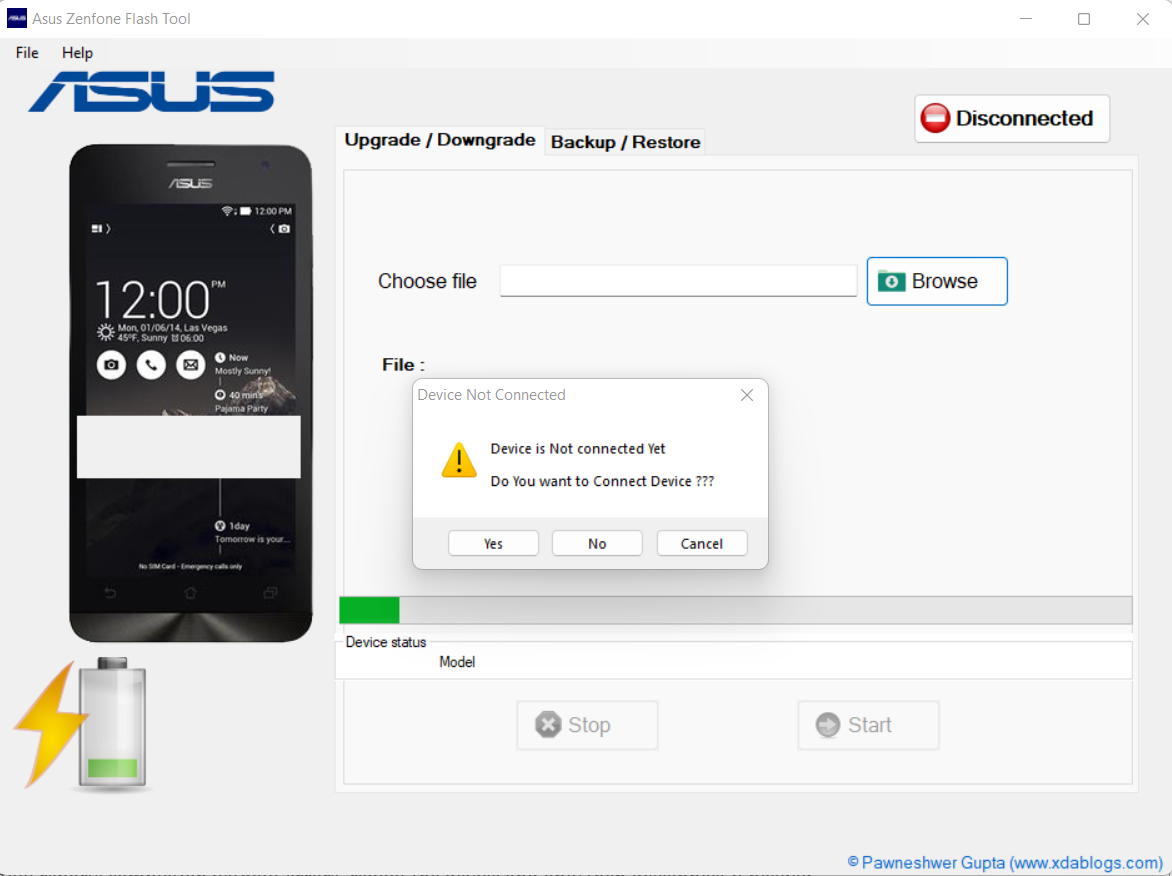
- Install the correct ASUS USB drivers on a Windows PC.
- Install a compatible version of ASUS Zenfone Flash Tool recommended for your device/firmware.
- Launch the tool and connect the Zenfone device via USB.
- Confirm that the device is detected correctly by the tool.
- Load the compatible Zenfone firmware package into the tool.
- Start the flashing process from the tool, following any on‑screen prompts.
- If prompted, allow the device to reboot into ASUS Recovery Mode.
- Select Apply update from ADB or the documented option only if instructed by ASUS or the firmware guide.
- Resume or continue the flashing process from the PC tool and wait for it to finish.
- After the tool reports completion without errors, reboot the device and only then disconnect if needed.
If your device behavior, menus, or tool messages do not match this flow, do not proceed. Using the wrong method for your model can cause more damage than it fixes.
Common Reasons ASUS Zenfone Flash Tool Flashing Fails
- ❌ Firmware not intended for Zenfone Flash Tool (different ASUS method required)
- ❌ Unsupported Zenfone model, Android version, or bootloader implementation
- ❌ Incorrect, missing, or conflicting ASUS USB drivers on the PC
- ❌ Wrong recovery mode, missing ADB sideload support, or incorrect menu selection
- ❌ Using this tool instead of Fastboot/AFT for newer Zenfone models
- ❌ Interrupting the process during recovery transition or USB transfer
Most failures occur due to model or method mismatch, not minor user mistakes in the flashing steps.
ASUS Zenfone Flash Tool vs Other ASUS Flashing Methods
| Method | Typical Use Case |
|---|---|
| ASUS Zenfone Flash Tool | Supported legacy Zenfone models with documented recovery/ADB-assisted flashing |
| Fastboot | Newer Zenfone devices and bootloader-unlocked models with partition images |
| ADB sideload | Recovery-only firmware updates using update ZIPs, with or without a PC tool |
| ASUS Flash Tool (AFT) / OEM tools | More recent ASUS flashing workflows and some service-center scenarios |
Always follow the flashing method specified by ASUS or the firmware provider for your specific Zenfone model and Android version.
Final Notes
ASUS Zenfone Flash Tool is a legacy, model-dependent utility, not a universal ASUS flashing solution or security bypass tool. When used with documented, compatible firmware on supported Zenfone devices, it can reliably restore or update those models.
If your firmware documentation does not explicitly reference this tool, do not assume compatibility. Instead, use the flashing method intended for your device, such as Fastboot, AFT, or other ASUS/OEM-authorized solutions.
FAQ
Can the ASUS Zenfone Flash Tool flash all Zenfone models?
No. It supports only specific legacy Zenfone generations and firmware packages that were built for it. Many newer devices require Fastboot or other ASUS tools instead.
Why does my Zenfone reboot into recovery during flashing?
On some supported models, recovery-based or ADB-assisted flashing is part of ASUS’s update flow, so the device reboots into recovery, where the tool continues the process.
Should I use Zenfone Flash Tool or Fastboot?
Always follow the firmware documentation. If ASUS or the firmware provider specifies Fastboot or AFT, use those instead; do not substitute Zenfone Flash Tool for unsupported models.