
YGDP Tool (Yulong Download Tool) is an OEM-specific firmware flashing utility primarily used for Coolpad (Yulong) and some legacy Chinese OEM Android devices. It is designed to flash manufacturer-packaged firmware intended specifically for use with YGDP.
This guide explains how YGDP Tool is used in supported scenarios, what you need before flashing, and—most importantly—its limitations.
Who This Guide Is For (Important)
Use this guide only if all of the following are true:
- ✔ You are flashing a Coolpad / Yulong or explicitly supported legacy device
- ✔ The firmware package is officially intended for YGDP Tool
- ✔ You are using a Windows PC
- ✔ You understand this is an OEM-specific tool, not a universal flasher
Do NOT use this guide if:
- ❌ Your device is from Samsung, Xiaomi, Oppo, Realme, Vivo, etc.
- ❌ You are trying to flash firmware meant for QFIL, Odin, Mi Flash, or SP Flash Tool
- ❌ You are attempting to use YGDP as a “general Qualcomm flashing tool”
YGDP Tool is not interchangeable with other flashing utilities.
⚠️ Critical Clarification (Read This)
YGDP Tool is not a general Qualcomm EDL flashing tool.
Although some supported devices may internally use Qualcomm chipsets and low-level flashing modes, YGDP does not provide user-level EDL control and should not be treated like QFIL, QPST, or other Qualcomm utilities.
YGDP works only with firmware packages explicitly built for it and relies on OEM-specific loaders and processes.
This distinction is essential to avoid flashing failures or device damage.
⚠️ Warnings & Risks
- Flashing firmware will erase all user data
- Flashing incorrect firmware can permanently brick the device
- Interrupting the process may cause irreversible failure
- YGDP Tool is intended for official OEM firmware only
FlashGuideHub does not host firmware files.
You are responsible for verifying firmware compatibility with your exact device model and variant.
Requirements
Before proceeding, ensure you have:
- Windows PC or Laptop
- Reliable USB cable (data transfer supported)
- YGDP Tool (compatible version)
- Required USB drivers for the target device
- Official firmware package intended for YGDP Tool
- At least 50% battery charge
Preparation Steps
- Install the required USB drivers for the device on your PC
(Restart the PC after installation if prompted.) - Extract the YGDP Tool archive to a known folder.
- Place the firmware package in an easily accessible location.
- Power off the smartphone completely.
Step-by-Step: Flashing Firmware with YGDP Tool
Step 1: Launch YGDP Tool
- Open the extracted YGDP Tool folder
- Run the main executable (e.g.
YGDP.exe) as Administrator
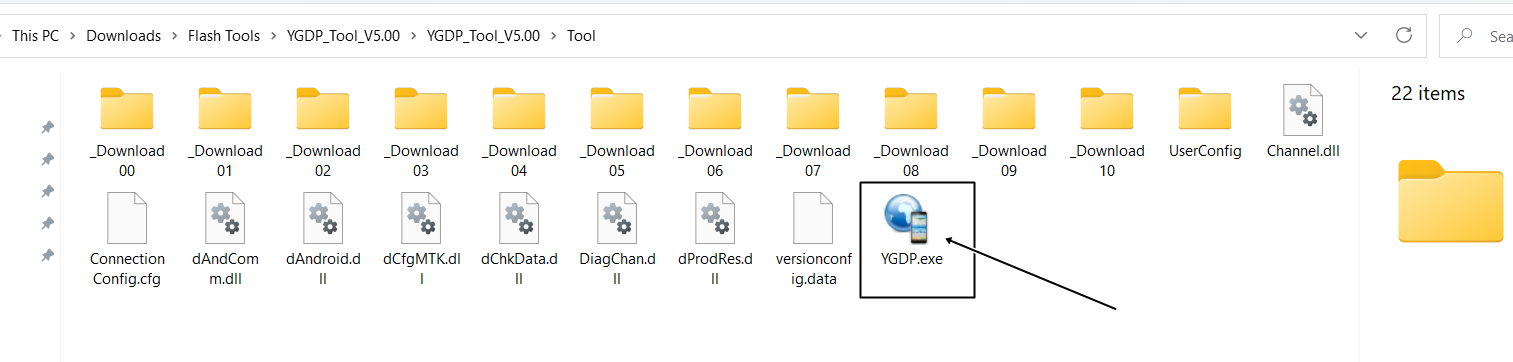
The YGDP interface should load.
Step 2: Load the Firmware Package
- Click Config, Load Packet, or the equivalent option
- Browse to the firmware location
- Select the CPB firmware file provided for the YGDP Tool
- Confirm the firmware is loaded successfully
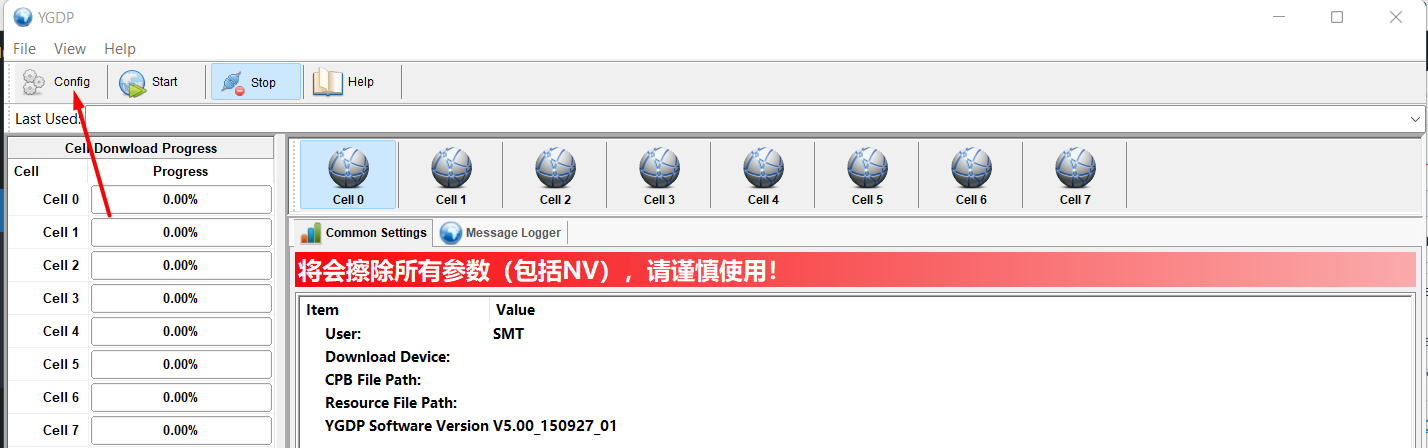
Only firmware explicitly designed for YGDP Tool should be loaded.
Step 3: Connect the Device
- Ensure the device is powered off
- Connect it to the PC using a USB cable
(Some devices may require holding a volume key while connecting.)
If drivers are installed correctly, YGDP Tool should recognize the device.
Step 4: Start Flashing
- Click Start
- Do not disconnect the device or interrupt the process
Flashing typically takes several minutes, depending on firmware size.
Step 5: Completion
When flashing completes successfully, YGDP Tool will display a success / passed message.
- Disconnect the USB cable
- Power on the device
- Wait patiently — first boot may take longer than normal
Common Reasons YGDP Flashing Fails
- ❌ Firmware not intended for YGDP Tool
- ❌ Wrong firmware for the device model
- ❌ Missing or incorrect USB drivers
- ❌ Faulty USB cable or USB port
- ❌ Interrupting the flashing process
Most failures occur due to firmware mismatch, not the tool itself.
Frequently Asked Questions
Is YGDP Tool the same as QGDP Tool?
No.
YGDP Tool is an OEM-specific utility, mainly associated with Coolpad/Yulong devices.
QGDP Tool is a different, Qualcomm-based service tool used by other manufacturers and often requires authorization.
Can YGDP Tool be used as a general Qualcomm flasher?
No. It should not be treated as a generic Qualcomm or EDL flashing utility.
Does YGDP Tool unlock the bootloader?
No. It only flashes firmware.
Final Notes
YGDP Tool should be used only in the narrow scenarios it was designed for. Treating it as a universal flashing solution or attempting to use it with incompatible firmware is the most common cause of failure.
When used with the correct device and firmware, YGDP Tool can reliably restore stock software on supported devices.