
PhoenixSuit is an official flashing utility developed for Allwinner-based Android devices. It is designed to install vendor-signed IMG firmware packages using a USB-based upgrade mode implemented at the chipset level.
This guide explains when PhoenixSuit is the correct tool, its limitations, and a safe, high-level workflow for flashing compatible Allwinner firmware — without assuming it works on all devices.
⚠️ PhoenixSuit is not a universal Android flashing tool. Using it with the wrong firmware or device can permanently brick the hardware.
Where PhoenixSuit Fits in the Allwinner Ecosystem
Allwinner devices use multiple flashing tools depending on firmware layout and hardware design.
PhoenixSuit is one of three main Allwinner utilities:
- PhoenixSuit → USB-based IMG flashing
- PhoenixCard → SD-card boot firmware installation
- LiveSuit → Legacy USB flashing for older chipsets
If you are unsure which tool applies to your device, read our hub first:
➡️ Allwinner Flashing Tools Explained (PhoenixSuit vs PhoenixCard vs LiveSuit)
Who This Guide Is For
Use PhoenixSuit only if all of the following apply:
- ✔ Your device uses an Allwinner chipset
- ✔ The firmware is packaged as a single
.imgfile - ✔ The firmware source explicitly references PhoenixSuit
- ✔ You accept that flashing will erase all user data
Do NOT use PhoenixSuit if:
- ❌ Your device is Qualcomm, MediaTek, Rockchip, or Exynos-based
- ❌ The firmware documentation mentions PhoenixCard or LiveSuit instead
- ❌ You are attempting to bypass FRP, account locks, or OEM security
- ❌ You are guessing compatibility based only on file extension
Important Limitations of PhoenixSuit
Before proceeding, understand these constraints:
- PhoenixSuit forces formatting during flashing
- It does not verify board ID or hardware revision
- There is no rollback protection handling
- A mismatched IMG file can cause a hard brick
- Not all Allwinner devices support USB upgrade detection
PhoenixSuit should only be used when the firmware provider explicitly instructs it.
Understanding PhoenixSuit Connection Mode
PhoenixSuit communicates with devices using a USB-based upgrade / FEL mode implemented by Allwinner.
Key points:
- The device is powered off
- A specific button combination is used during USB connection
- The chipset exposes a low-level upgrade interface
- PhoenixSuit detects the device automatically when successful
This is not Fastboot, not ADB, and not Qualcomm EDL.
If the device is not detected:
- The firmware may not support PhoenixSuit
- The device may require PhoenixCard instead
- The button combination may differ by model
- USB drivers may be missing or incorrect
What You Need
- A Windows PC
- A compatible Allwinner device
- A reliable USB cable
- PhoenixSuit Tool (vendor or trusted source)
- Correct Allwinner USB drivers
- The exact IMG firmware for your device and board
High-Level PhoenixSuit Flashing Workflow
⚠️ This is a conceptual workflow, not a universal step-by-step recipe.
Follow it only when your firmware documentation confirms PhoenixSuit usage.
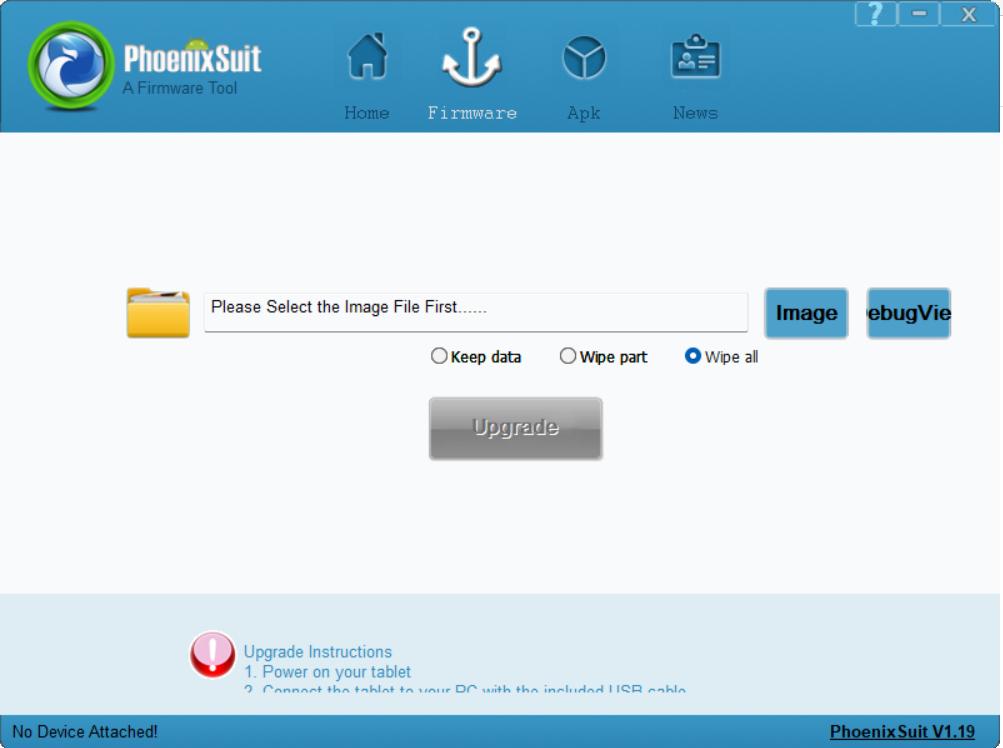
- Install the required Allwinner USB drivers on your PC.
- Launch PhoenixSuit with administrator privileges.
- Load the compatible
.imgfirmware file inside PhoenixSuit. - Power off the device completely.
- Connect the device to the PC using the vendor-specified button combination to trigger upgrade mode.
- Confirm that PhoenixSuit detects the device.
- Accept the mandatory format prompt when requested.
- Allow the flashing process to complete without disconnecting the cable.
- Wait for PhoenixSuit to report successful completion.
- Disconnect and boot the device only after the tool confirms success.
If your experience differs from this workflow, stop immediately and reassess the tool–firmware match.
Common Reasons PhoenixSuit Flashing Fails
Most failures are caused by tool or firmware mismatch, not small mistakes.
Common causes include:
- Using PhoenixSuit for PhoenixCard firmware
- Incorrect or missing USB drivers
- Device not entering the correct upgrade mode
- Board or hardware revision mismatch
- Corrupted or incomplete IMG firmware
Repeated attempts with incompatible firmware can make recovery impossible.
Final Notes
PhoenixSuit is a powerful but unforgiving Allwinner flashing utility.
It works reliably only when used exactly as intended by the firmware provider. If your firmware documentation does not clearly mention PhoenixSuit, do not assume compatibility.
Using the wrong Allwinner tool is one of the fastest ways to permanently brick a device.