
This guide explains when Nokia OST Tool (OST LA) is appropriate, its limitations on modern Nokia/HMD devices, and a safe, high-level flashing workflow for official MLF/NB0 firmware, without promising bypass of security, FRP, or account locks.
Who This Guide Is For
Use this guide only if all of the following apply:
- ✔ Your device is a Nokia smartphone from the HMD Global era
- ✔ The firmware package is provided as a
.mlfor.nb0file - ✔ The firmware documentation explicitly references OST Tool / OST LA as the flashing method
- ✔ You understand that flashing erases user data and may permanently brick the device if misused
Do NOT use the OST Tool if:
- ❌ Your device is not a Nokia/HMD smartphone
- ❌ Your firmware is intended for Fastboot, QFIL, QPST, or another OEM/service tool
- ❌ You are attempting to bypass FRP, account locks, or OEM security mechanisms
- ❌ The firmware requires online service authorization that you do not have
- ❌ You assume that any
.mlfor.nb0file will automatically work with OST
Important: A
.mlfor.nb0file alone does not guarantee OST compatibility. Always follow the firmware provider’s documented tool and process.
Flashing Disclaimer
Flashing firmware is inherently risky. FlashGuideHub is not responsible for data loss, device malfunction, or permanent hardware damage caused by incompatible firmware, authorization restrictions, incorrect drivers, or improper flashing procedures.
Before proceeding, always verify:
- Exact device model and variant
- Correct firmware region and build (CID, product code, or variant)
- Confirmed OST Tool support in official Nokia/HMD or trusted service documentation
For full details, read our Flashing Disclaimer.
Understanding OST Firmware Formats (MLF vs NB0)
OST Tool supports specific Nokia firmware formats, which are not interchangeable and may require different OST versions or authorization:
.mlf- Common in older Nokia/HMD firmware packages
- Usually full firmware images intended for offline or semi‑offline OST flashing
- Often tied to particular OST LA versions for stable use
.nb0- Used in many newer Nokia firmware packages
- May require online authentication or service‑side authorization
- Frequently restricted by model, region, or service access level
If your firmware provider does not explicitly mention OST Tool, do not assume that a MLF or NB0 file will work, even if OST can technically load it.
Authentication & Authorization Limitations
Modern OST Tool builds, especially those used in service environments, may enforce:
- Online login or session validation
- Authorized service credentials or accounts
- Firmware-specific permissions or entitlement checks
Important points:
- Offline access or patched binaries do not guarantee flashing success and may violate terms
- Firmware may appear to load but still fail during flashing due to authorization checks
- Some OST builds are designed only for authorized service centers and not for public use
FlashGuideHub does not recommend bypassing authentication mechanisms, modifying OST binaries, or using unauthorized access methods.
Understanding Nokia Download / Emergency Mode
OST Tool communicates with Nokia devices using a vendor-specific Qualcomm download/emergency mode, which is not standard Fastboot and differs from generic EDL workflows.
Key points:
- The device must usually be powered off before entering download/emergency mode
- A specific key combination is required to trigger the correct mode (varies by model)
- Correct Nokia/Qualcomm USB drivers must be installed on the PC
- The device must be detected in OST as a compatible target before flashing can begin
If the device is not detected in OST:
- The firmware may not support OST for that model
- The device may require a different flashing method (e.g. Fastboot, QFIL, OEM service tool)
- Authorization, drivers, or correct mode selection may be missing
When OST Tool Is the Right Tool
OST Tool is appropriate when:
- Nokia/HMD documentation explicitly references OST Tool / OST LA for that firmware
- The MLF/NB0 firmware loads correctly inside OST without format errors
- The device is detected in the expected Nokia download/emergency mode
- The flashing process starts without login, signature, or authorization errors
If any of these conditions are not met, stop and reassess the flashing method. In some cases, other documented options (such as Fastboot on unlocked devices or QFIL‑based service firmware) may be more appropriate.
High-Level OST Tool Flashing Workflow
⚠️ This is a conceptual overview, not a guaranteed step-by-step procedure. Only follow it when your firmware documentation explicitly matches OST Tool usage for your exact Nokia model.
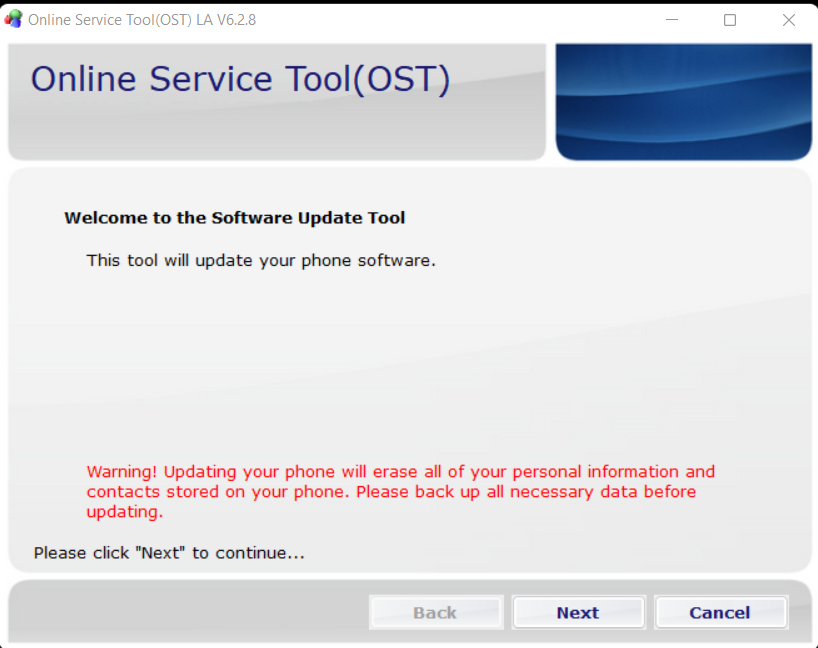
- Install the correct Nokia / Qualcomm USB drivers on a Windows PC.
- Install a compatible version of OST Tool (OST LA), ideally the version recommended with your firmware.
- Launch OST Tool and log in or proceed only if current authentication requirements allow access.
- Load the compatible
.mlfor.nb0firmware file inside OST. - Select the appropriate flashing mode (for example, Normal or Emergency) only if documented by Nokia/HMD or trusted guides.
- Power off the device completely.
- Boot the device into the required Nokia download/emergency mode using the correct key combination.
- Connect the device to the PC and confirm that OST detects it as a valid target.
- Start the flashing process and do not disconnect the device or close OST while flashing is in progress.
- Wait for OST to report completion without errors, then safely reboot the device.
If your device behavior, OST messages, or firmware instructions do not align with this workflow, do not proceed. You may need a different tool, access level, or method.
Common Reasons OST Tool Flashing Fails
- ❌ Firmware not intended for OST Tool (wrong tool for that MLF/NB0 package)
- ❌ Missing, outdated, or incorrect Nokia/Qualcomm USB drivers
- ❌ Device model, variant, or region mismatch between phone and firmware
- ❌ Online authorization or service account required but unavailable
- ❌ Wrong OST Tool version for the specific firmware
- ❌ Attempting to bypass login, security checks, or service restrictions
Most failures are caused by authorization or compatibility issues rather than small procedural mistakes in the flashing steps.
OST Tool vs Other Nokia Flashing Methods
| Tool | Typical Use Case |
|---|---|
| OST Tool (OST LA) | Official Nokia/HMD firmware flashing with supported MLF/NB0 packages |
| Fastboot | Flashing partitions on bootloader-unlocked Nokia devices where images are provided |
| QFIL / QPST | Qualcomm service firmware in Firehose/XML format (limited Nokia scenarios) |
| OEM / service tools | Authorized service center repairs and online‑linked procedures |
Always use the flashing method and tool specified by the firmware provider or Nokia/HMD service documentation for your specific device.
Final Notes
OST Tool is a Nokia/HMD-specific service utility, not a general-purpose flasher or security bypass tool. When used with official, compatible firmware and proper authorization, it can reliably restore supported Nokia smartphones.
If your firmware documentation does not explicitly reference OST Tool, do not assume compatibility. Instead, follow the flashing method intended by the firmware provider, such as Fastboot, QFIL, or other OEM-authorized solutions.
FAQ
Can OST Tool flash any .mlf or .nb0 firmware?
No. OST Tool only supports firmware packages explicitly built and authorized for OST-based flashing on compatible Nokia/HMD devices.
Why does OST ask for login or online access?
Many OST builds require online authentication or service credentials for security and control. Without valid access, flashing may be blocked or fail mid‑process.
What should I do if my Nokia device is not detected?
This usually indicates incorrect drivers, an incorrect download/emergency mode, unsupported firmware, or missing service authorization. In such cases, check official documentation or consider other documented flashing methods.