

Before you flash: Flashing firmware will erase all data on your device. Back up contacts, photos, and apps before proceeding. FlashGuideHub is not responsible for any damage caused by following this guide.
About the Redmi K60 Pro
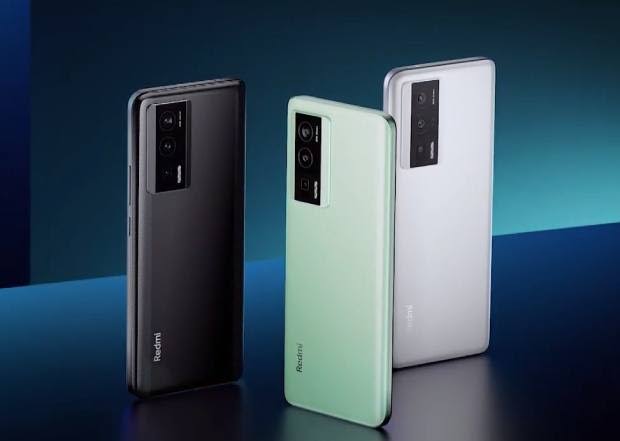
The Redmi K60 Pro (codename: socrates) launched in December 2022 (China only) as a flagship-tier phone built around the Qualcomm SM8550 Snapdragon 8 Gen 2 (4nm), but it was released exclusively in China. Xiaomi never brought this exact model to Global, EEA, or India markets under any name.
Because of this, every firmware package for socrates carries a China (CNXM) suffix — there is no other regional branch to choose from. If you imported the phone from China and want an international-style experience, read the FAQ below before flashing anything.
Which Flash Mode Should You Use?
Mi Flash Tool (Fastboot ROM)
The standard route for socrates. Mi Flash Tool runs the bundled flash_all script from Xiaomi's official China-region package, writing bootloader, modem, system, and vendor partitions in one pass. Requires an unlocked bootloader and wipes user data as part of the process.
Manual ADB / Fastboot Commands
Run individual fastboot flash commands from Platform Tools instead of the Mi Flash Tool interface. Useful for reflashing one partition, such as a modem image, without redoing the entire ROM.
EDL / QFIL (Emergency)
The Snapdragon 8 Gen 2 supports Qualcomm Emergency Download mode at the hardware level, usable when socrates no longer responds in Fastboot. Xiaomi withholds the signed programmer file QFIL needs for this platform, so this path is mostly limited to an authorised repair centre.
What You Need Before Flashing
Mi Flash Tool's interface only runs on Windows. Download it and the Xiaomi USB driver package from Xiaomi's developer site before starting.
Turn on OEM Unlocking in Developer Options, bind your Mi Account with China region selected, then run Mi Unlock Tool from a PC.
Check Settings → About Phone for your build string. There is only one regional branch for socrates — no Global, EEA, or India build exists.
Fastboot needs a real data connection. Use a confirmed data-capable USB-C cable plugged directly into a PC port rather than a hub.
A shutdown mid-flash while the modem or boot partition is writing can leave socrates unable to reach Fastboot again. Charge to at least 60% first.
Both the account-bind step for unlocking and the flash itself wipe internal storage. Move everything to cloud storage or a PC before starting.
How to Flash the Redmi K60 Pro — Quick Overview
8-step quick reference for the Redmi K60 Pro. Need visuals or troubleshooting help? The full Mi Flash Tool guide covers everything in detail.
-
Confirm fastboot reports socrates, not nabu or ripley
-
Understand that socrates has no Global, EEA, or India release
-
Unlock the bootloader with a China Mi Account
-
Download a CNXM-branch fastboot ROM matching your MIUI/HyperOS build
-
Install Qualcomm/Xiaomi USB drivers and open Mi Flash Tool
-
Extract the fastboot package and flash from the top-level folder
-
Wait for the flash to finish without disconnecting the cable
-
Verify 5G signal, camera, and screen refresh rate after first boot
Finding the Firmware Package for SM8550
Xiaomi ships socrates firmware as a China-region fastboot archive (.tgz). There is no Global, EEA, or India equivalent — every available package carries a CNXM suffix. Once fully extracted, the folder Mi Flash Tool needs contains a top-level flashing script alongside the partition images:
flash_all.bat
This script lives inside the extracted fastboot ROM. After decompressing the .tgz, find flash_all.bat (Windows) or flash_all.sh (Linux/Mac) at the top level, next to an images folder holding the individual partition files. Extract fully to a folder on your PC first — running the script from inside the compressed archive will not work.
Unlike most Xiaomi devices that ship several regional branches, socrates only exists on one branch: China (CNXM). Xiaomi never issued a Global, EEA, Russia, or India firmware tree for the Redmi K60 Pro — it was sold exclusively inside China, and this is not a gap in available downloads but the actual release history of the device.
Inside the extracted .tgz, flash_all.bat (Windows) and flash_all.sh (Linux/Mac) sit at the top level next to an images folder holding the individual partition files. Point Mi Flash Tool's Select field at that top-level folder, not the images subfolder, then click Flash.
Because there is only a China ROM, expect the system language, default app store, and bundled services to be set for the China market after flashing, even if you plan to use the phone outside China.
Redmi K60 Pro Firmware Versions
Known stock fastboot ROM releases for the Redmi K60 Pro. All builds are China (CNXM) — no other region exists for this device.
| Version | Region | Android Version | Size | MD5 | Download |
|---|---|---|---|---|---|
OS2.0.206.0.VMKCNXM |
China (CN) u2014 HyperOS (Android 14) | — | 6.4 GB | — | ⬇️ Download |
OS1.0.3.0.UMKCNXM |
China (CN) u2014 HyperOS (Android 14) | — | 6.1 GB | — | ⬇️ Download |
More builds and recoveries for socrates → View the source listing on AndroidFirmwareFile.com →
Redmi K60 Pro — Important Notes
The Redmi K60 Pro (socrates) was never sold outside China, and Xiaomi has never released a Global, EEA, or India firmware branch for it. Anyone searching for a "Global ROM for socrates" will not find one — every fastboot package uses the CNXM suffix, and this is the confirmed, permanent release status of the device rather than a temporary gap.
Readers who want similar Snapdragon 8 Gen 2 hardware with an official Global release should look at the POCO F5 Pro (mondrian), a related but separate codename that Xiaomi did release internationally. socrates and mondrian share close internals but are not interchangeable at the firmware level — each needs its own matching ROM.
Common Errors on the Redmi K60 Pro
Mi Flash Tool device list stays empty in Fastboot mode
Check Device Manager on the PC — if socrates shows as an unrecognized device instead of an Android Bootloader Interface, the Xiaomi/Qualcomm USB driver did not install correctly. Reinstall the driver package, use a confirmed data-capable USB-C cable, and connect to a rear motherboard port rather than a front panel header.
FAILED (remote: 'Command not allowed')
socrates' bootloader is still locked and refusing the write. Check Developer Options for a confirmed "Bootloader unlocked" status. Because socrates is a China-only device, the Mi Unlock approval process for accounts registered outside China can take noticeably longer than for Global-market phones, so a pending countdown timer in Mi Unlock Tool is common here.
Sahara Fail S9
Mi Flash Tool loses the Sahara handshake with the Snapdragon 8 Gen 2 mid-flash, usually from an incompletely extracted .tgz or an interrupted download. Redownload the CNXM fastboot package, extract fresh to a short path such as C:\socrates, and confirm the cable is fully seated before flashing again.
No 5G signal and IMEI shows as null after flashing
The modem/NV partition on socrates did not write correctly, often from flashing an out-of-date CNXM build over a newer one without a full wipe. Reflash the latest CNXM package using the full flash type in Mi Flash Tool rather than the save-user-data option.
Phone stuck on the Redmi logo after a Mi Flash Tool session
A hang on the boot logo means the flash was interrupted before every partition finished writing, common if the USB-C cable was bumped during the 120W HyperCharge circuit initialization step. Hold Volume Down + Power for about 10 seconds to force back into Fastboot, reselect the same extracted CNXM folder, and run the full flash type again.
For the full firmware error database: Fastboot Error Directory →
Frequently Asked Questions — Redmi K60 Pro
No. Xiaomi never released the Redmi K60 Pro (socrates) outside China, and no Global, EEA, or India firmware branch exists for this codename. Every fastboot ROM available for socrates carries a CNXM-style suffix. If you need a Global-market equivalent, look at the POCO F5 Pro (mondrian), which shares similar internals but ships as a distinct codename with its own Global firmware.
Yes, initially. socrates firmware ships with Chinese as the default system language and the Xiaomi GetApps store configured for the China region rather than Google Play. You can add English and other languages under Settings → Languages & Input after first boot, but Google Play Services generally needs to be sideloaded separately since it is not preinstalled on China ROMs.
No. As a China-only device, socrates ships without Google Mobile Services preinstalled. Most owners sideload a Google Play/GMS package after flashing, which works but is not officially supported by Xiaomi and can occasionally break after a system update.
This Sahara-protocol handshake failure on the Snapdragon 8 Gen 2 usually means the .tgz did not extract completely or the download was interrupted partway. Redownload the CNXM package, extract it fresh to a short path with no special characters, and confirm the USB-C cable is a genuine data cable before retrying.
Ready to Flash?
Follow the full step-by-step Mi Flash Tool guide with interactive progress tracking, prerequisite checklist, and complete troubleshooting.