

Before you flash: Flashing firmware will erase all data on your device. Back up contacts, photos, and apps before proceeding. FlashGuideHub is not responsible for any damage caused by following this guide.
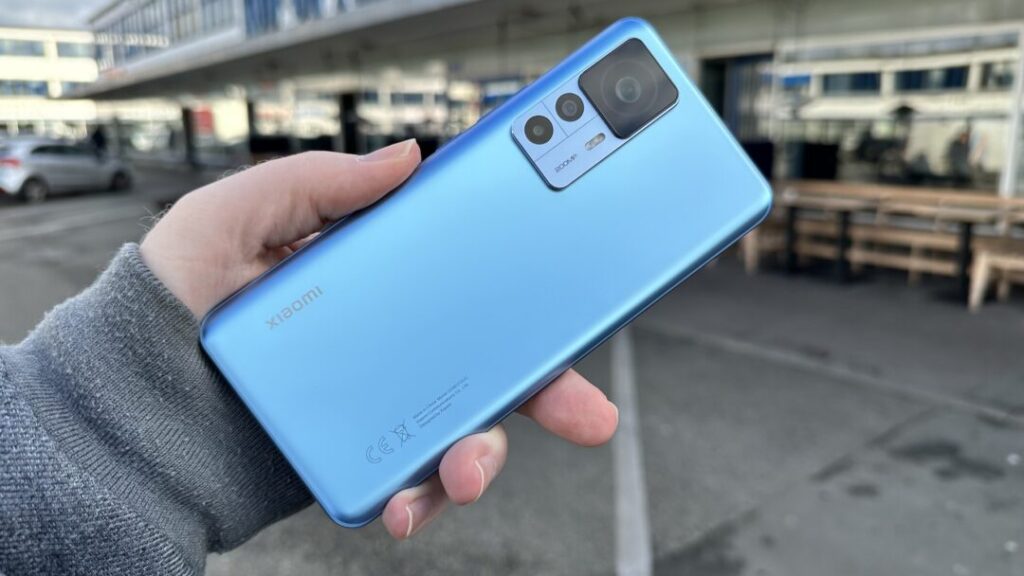
About the Xiaomi 12T Pro / Redmi K50 Ultra
This workshop guide provides step-by-step instructions to flash official stock firmware to the Xiaomi 12T Pro / Redmi K50 Ultra (August 2022 (Redmi K50 Ultra, China), October 2022 (Xiaomi 12T Pro, Global / EEA)) using Mi Flash Tool.
Whether your device is trapped in a startup bootloop, recovering from corrupted partitions, or returning to a clean factory state, follow the verified prerequisites and flashing procedures below.
Which Flash Mode Should You Use?
Fastboot Mode (Mi Flash Tool)
Standard official flashing interface for unlocked Xiaomi devices via flash_all.bat.
Mi Assistant (Recovery Sideload)
Emergency recovery interface used to restore official stock software without wiping storage on locked bootloaders.
Qualcomm EDL 9008 Mode
Low-level hardware recovery mode used when the phone is hard-bricked, unresponsive, or cannot reach Fastboot.
What You Need Before Flashing
Mi Flash Tool runs on Windows. Install the latest official version alongside Google Android SDK Platform-Tools.
Fastboot flashing requires an authorized bootloader unlock through Xiaomi Community and the official Mi Unlock tool.
Download the correct regional .tgz archive (VLFEUXM for EEA, VLFMIXM for Global, VLFCNXM for China) matching your hardware.
Connect using the original 6A Type-C data cable plugged directly into a rear motherboard USB 2.0 port to prevent dropouts.
Ensure the 5,000 mAh battery has adequate charge to prevent power failure during dynamic partition flashing.
Selecting "clean all" completely erases internal user data, apps, and storage. Back up all vital files before proceeding.
How to Flash the Xiaomi 12T Pro / Redmi K50 Ultra — Quick Overview
A fast reference for flashing the Xiaomi 12T Pro / Redmi K50 Ultra (Snapdragon 8+ Gen 1) using Mi Flash Tool. For the complete walkthrough with images and error troubleshooting, see the full guide.
-
Verify Bootloader Unlock Status
-
Extract Fastboot Archive Twice
-
Move to Root Directory
-
Boot into Fastboot Mode
-
Connect via Rear USB 2.0 Port
-
Load Script in Mi Flash Tool
-
Run the Flashing Script
-
First Boot and Initialization
Firmware Package for SM8475
flash_all.bat
Xiaomi 12T Pro / Redmi K50 Ultra Firmware Versions
These are the tested primary stock Fastboot packages for the Xiaomi 12T Pro and Redmi K50 Ultra. If you need recovery OTA packages, regional builds (Japan, Russia, Turkey, Taiwan), or custom ROMs, browse the complete archive on AndroidFirmwareFile.
| Version | Region | Android Version | Size | MD5 | Download |
|---|---|---|---|---|---|
OS3.0.2.0.VLFCNXM |
China (CN) u2014 Redmi K50 Ultra, HyperOS 3 (Android 15) | Android 15.0 (HyperOS 3.0) | 7.0 GB | 63e476d0ff87255b1f45b13b069054e3 |
⬇️ Download |
OS3.0.4.0.VLFMIXM |
Global (MI) u2014 Xiaomi 12T Pro, HyperOS 3 (Android 15) | Android 15.0 (HyperOS 3.0) | 6.5 GB | 8b2ce4e6dd074582cb55f38c80b24567 |
⬇️ Download |
OS3.0.3.0.VLFEUXM |
EEA (Europe) u2014 Xiaomi 12T Pro, HyperOS 3 (Android 15) | Android 15.0 (HyperOS 3.0) | 6.6 GB | e1371470c2b43c43e5fc89f64d619c0a |
⬇️ Download |
Need recovery OTA packages or additional regional builds? Browse all 17 diting firmware packages on AndroidFirmwareFile.com →
Troubleshooting Xiaomi 12T Pro & Redmi K50 Ultra Flashing Errors
FAILED (remote: 'Partition table doesn't exist' or Super Image Write Timeout)
USB 3.0/3.1 port packet dropped during large dynamic super partition chunk streaming, or outdated fastboot binary unable to process sparse image blocks exceeding 4GB. Update to Android SDK Platform-Tools v35+, switch the USB cable to a native rear motherboard USB 2.0 port, and avoid front PC case ports or external USB hubs.
Camera App Force-Closes or Shows Black Preview After Clean Flash
Flashing a European/Global build (calibrated for 200MP Samsung HP1) onto China Redmi K50 Ultra hardware (fitted with 108MP Samsung HM6), or vice versa. Reflash the firmware branch that matches your physical hardware sensor (VLFCNXM for China 108MP units, VLFEUXM/VLFMIXM for Global 200MP units), or utilize a sensor-patched community vendor image.
Mi Flash Error: "Not catch checkpoint ($fastboot -s .* flash crclist)"
Mi Flash Tool checkpoint regex parsing mismatch with newer Xiaomi HyperOS fastboot scripts that omit legacy CRC verification logs. This is a cosmetic tool reporting error; the partition write has already completed successfully. Wait until the phone vibrates and reboots into HyperOS, then safely disconnect the cable.
For the full error database: Error Directory →
Frequently Asked Questions — Xiaomi 12T Pro / Redmi K50 Ultra
Community repair discussions indicate this error occurs when the fastboot script checks the device product name against a hardcoded string that does not match what the bootloader returns. If you are flashing a cross-regional ROM (e.g. flashing Global firmware on a China Redmi K50 Ultra), verify with "fastboot getvar product". If the command returns "diting", open flash_all.bat with a text editor and inspect the first few lines checking product strings. Technicians suggest ensuring your installed Google Platform-Tools binary is up to date, as older fastboot versions report truncated product variables.
This issue almost always stems from file path depth or special characters in the directory path. Windows command-line environments struggle with deeply nested folder trees (such as C:\Users\Downloads\Compressed\diting_images_...\). Move the entire extracted ROM directory to a clean, short root path like C:\diting_fw\. Additionally, ensure you selected the parent directory that contains flash_all.bat and flash_all.sh, rather than selecting the inner "images" subfolder.
On the Snapdragon 8+ Gen 1 platform, display panel calibration parameters and optical fingerprint sensor alignment matrices are stored in the persist partition and loaded through vendor ramdisk modules. If a flash script or custom recovery modifies or fails to mount the persist partition, biometric calibration data can be temporarily unindexed. Community technicians advise performing a clean reboot and allowing HyperOS to complete its background ART runtime compilation, and re-enrolling fingerprints under bright ambient lighting.
If the phone fails to respond to Volume Down + Power and Windows Device Manager shows "Qualcomm HS-USB QDLoader 9008", the device has dropped into low-level Emergency Download mode. Because Xiaomi restricts Snapdragon 8+ Gen 1 firehose programmer files to authorized service accounts, self-service QFIL flashing is blocked. Workshop technicians recommend first attempting a hardware cold reset: disconnect the USB cable, hold Power + Volume Down + Volume Up simultaneously for 25 to 30 seconds to discharge motherboard capacitors, and release when the device vibrates back into Fastboot.
Ready to Flash?
Follow the full step-by-step Mi Flash Tool guide with interactive progress tracking, prerequisite checklist, and complete troubleshooting.