

Before you flash: Flashing firmware will erase all data on your device. Back up contacts, photos, and apps before proceeding. FlashGuideHub is not responsible for any damage caused by following this guide.
About the OnePlus 8 Pro
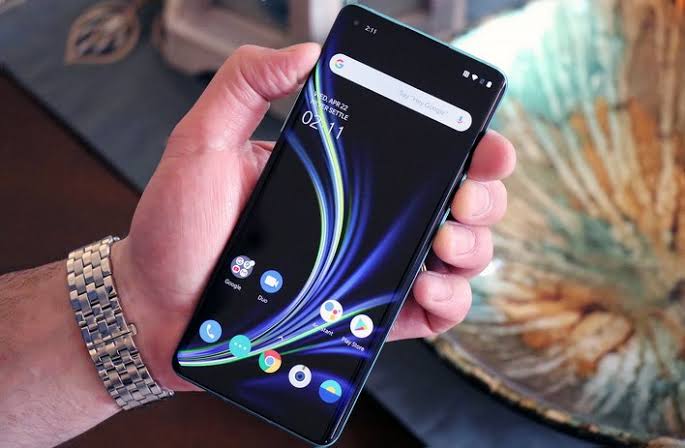
The OnePlus 8 Pro (codename: instantnoodlep) is a flagship Android smartphone released in April 2020, powered by the Qualcomm Snapdragon 865 5G (SM8250) processor. OnePlus distributed it across four regional hardware variants.
Each variant carries distinct RF modem configurations. The Prerequisites and Firmware Package sections below explain how to verify your model number and select the correct firmware before starting.
Which Flash Mode Should You Use?
MSM Download Tool (EDL Recovery)
The official Qualcomm boot ROM recovery method for the OnePlus 8 Pro. Overwrites raw physical disk partitions via Qualcomm HS-USB QDLoader 9008 mode. Unbricks hard-bricked devices, restores factory partition layouts, and locks the bootloader automatically.
OxygenOS Local Update
System-level upgrade utility built into OxygenOS. Installs official full update ZIP archives directly from internal storage without requiring a computer or bootloader unlock.
Fastboot Command Line
Standard Android bootloader interface for writing individual partition images (boot, system, vbmeta). Requires an unlocked bootloader and payload.bin extraction tools.
What You Need Before Flashing
Required to execute MSM Download Tool and communicate with Snapdragon 865 boot ROM. Install Qualcomm HS-USB QDLoader 9008 drivers before connecting the phone.
Verify model number IN2023 under Settings -> About device. Download the corresponding European IN2023 OxygenOS package to prevent modem band mismatches.
Use a reliable USB-C data cable connected to a direct USB 2.0 port on your computer motherboard to avoid disconnection during EDL flashing.
Ensure battery has sufficient charge before starting MSM Download Tool flashing to avoid power loss during low-level partition writes.
Low-level MSM Download Tool flashing wipes all internal storage and resets the phone to factory settings. Back up all files prior to flashing.
How to Flash the OnePlus 8 Pro — Quick Overview
6-step quick reference for the OnePlus 8 Pro. Need visuals or troubleshooting help? The full MSM Download Tool guide covers everything in detail.
-
Identify your exact regional model number and OxygenOS branch
-
Install Qualcomm HS-USB QDLoader 9008 drivers on your Windows PC
-
Boot the OnePlus 8 Pro into Qualcomm EDL (Emergency Download) mode
-
Launch MsmDownloadTool.exe and select the correct target region
-
Click Start in MSM Download Tool and maintain USB connection
-
Allow automatic system reboot and verify OxygenOS system status
Finding the Firmware Package for SM8250
The OnePlus 8 Pro OxygenOS firmware package contains full system partition binaries (including boot.img, super.img, vbmeta.img, and modem.bin) alongside the MSM Download Tool executable and OPS configuration archive. After extracting the downloaded package, locate:
OPS Firmware Package
This package is inside the extracted OxygenOS archive. Look for MsmDownloadTool.exe alongside the OPS configuration file at the top level of the extracted folder. Do not run the executable from inside a compressed ZIP file.
The OnePlus 8 Pro (codename: instantnoodlep) is produced in four regional hardware variants: IN2020 (China), IN2021 (India), IN2023 (Europe/GDPR), and IN2025 (North America). All variants share the Qualcomm Snapdragon 865 5G SM8250 processor, Adreno 650 GPU, and 6.78-inch QHD+ 120Hz Fluid AMOLED display, but carry distinct RF modem calibration and band support.
When restoring firmware via MSM Download Tool, ensure that MsmDownloadTool.exe is launched from the same directory containing the extracted OPS binary files. Verify that the Target region dropdown inside the tool is configured to match your hardware variant (EU for IN2023).
Note: OxygenOS 12 and OxygenOS 13 updates use a unified super partition structure containing system, system_ext, vendor, and product partitions. Direct Fastboot flashing of individual images requires extracting payload.bin using a payload extraction utility.
OnePlus 8 Pro Firmware Versions
Known stock firmware releases for the OnePlus 8 Pro. Always verify the version matches your device region before flashing.
| Version | Region | Android Version | Size | MD5 | Download |
|---|---|---|---|---|---|
11_C.35 (IN2023_11.C.35_20220826) |
IN2023 — European Union (GDPR) | Android 12 (OxygenOS 12.1) | 6.70 GB | — | ⬇️ Download |
More builds and newer regional variants may be added over time. View the source listing on AndroidFirmwareFile.com ->
OnePlus 8 Pro — Important Notes
The OnePlus 8 Pro launched on Android 10 (OxygenOS 10.5) and officially received updates through Android 11 (OxygenOS 11), Android 12 (OxygenOS 12.1), and Android 13 (OxygenOS 13). Full update zips can be installed locally on working units using Settings -> About device -> Up to date -> Local install.
If the device becomes completely unbootable or enters a bootloop where Recovery and Fastboot are inaccessible, Qualcomm EDL mode (COM 9008) provides low-level hardware unbricking using MSM Download Tool without requiring fastboot bootloader authorization.
Common Errors on the OnePlus 8 Pro
Device not detected / Missing Qualcomm HS-USB QDLoader 9008 in Device Manager
Windows shows an Unknown Device or no new COM port when entering EDL mode. Reinstall 64-bit Qualcomm drivers, disable Driver Signature Enforcement on Windows 10/11, use an original USB-A to USB-C cable, and connect to a motherboard USB 2.0 port.
MSM Download Tool: "Sahara Communication Failed" or "Param read failed"
The Sahara protocol handshake timed out during boot ROM initialization. Disconnect USB cable, hold Power + Volume Down for 15 seconds to exit frozen EDL state, re-enter EDL mode using Volume Up + Volume Down, and click Start immediately after port detection.
MSM Download Tool: "Device mismatch" or "Target does not match project"
The selected target dropdown setting inside MSM Download Tool does not match the connected device region ID (e.g. selecting IN or NA on an EU IN2023 phone). Set Target dropdown to EU inside the tool settings before clicking Start.
Fastboot: FAILED (remote: 'Flashing is not allowed in Lock State')
Fastboot partition flashing requires an unlocked bootloader. Run fastboot flashing unlock while in bootloader mode. If bootloader cannot be unlocked due to system crash, use MSM Download Tool in EDL mode which bypasses bootloader state.
Stuck on OnePlus logo / Bootloop after local OxygenOS upgrade
Occurs when upgrading across major OxygenOS versions without clearing cache or when flashing corrupted update packages. Boot to OxygenOS Recovery by holding Volume Down + Power, select Wipe data and cache, or restore stock build using MSM Download Tool.
No Mobile Network / Unknown Baseband / Missing IMEI after cross-flashing
Flashing modem files from a different regional model (e.g. IN2020 Chinese firmware onto IN2023 European hardware) corrupts modemst1 and modemst2 EFS partitions. Re-flash the exact IN2023 MSM Download Tool factory package to restore original modem firmware.
For the full MSM Download Tool error database: MSM Download Tool Error Directory →
Frequently Asked Questions — OnePlus 8 Pro
Check Settings -> About device -> Model or inspect the label on original packaging. IN2020 represents the Chinese variant, IN2021 targets India, IN2023 is designated for Europe/Global regions, and IN2025 is for North America. Each model carries distinct 5G band configurations in modem firmware.
MSM Download Tool is an official factory flashing utility that communicates directly with the Snapdragon 865 boot ROM via Qualcomm EDL mode (COM port 9008). It overwrites raw physical disk partitions to recover hard-bricked devices that cannot boot into Fastboot or Recovery.
Communication errors usually stem from missing Qualcomm 9008 drivers, faulty USB cables, or plugging into a USB 3.0 port. "Packed image does not exist" indicates that the tool executable was launched outside the extracted OPS firmware directory.
Fastboot flashing can be used if the bootloader is already unlocked and the device can reach bootloader mode. For hard bricks where Fastboot is inaccessible or the system is corrupted, MSM Download Tool in EDL mode is required.
Ready to Flash?
Follow the full step-by-step MSM Download Tool guide with interactive progress tracking, prerequisite checklist, and complete troubleshooting.