

Before you flash: Flashing firmware will erase all data on your device. Back up contacts, photos, and apps before proceeding. FlashGuideHub is not responsible for any damage caused by following this guide.
About the Xiaomi Redmi Note 12 4G
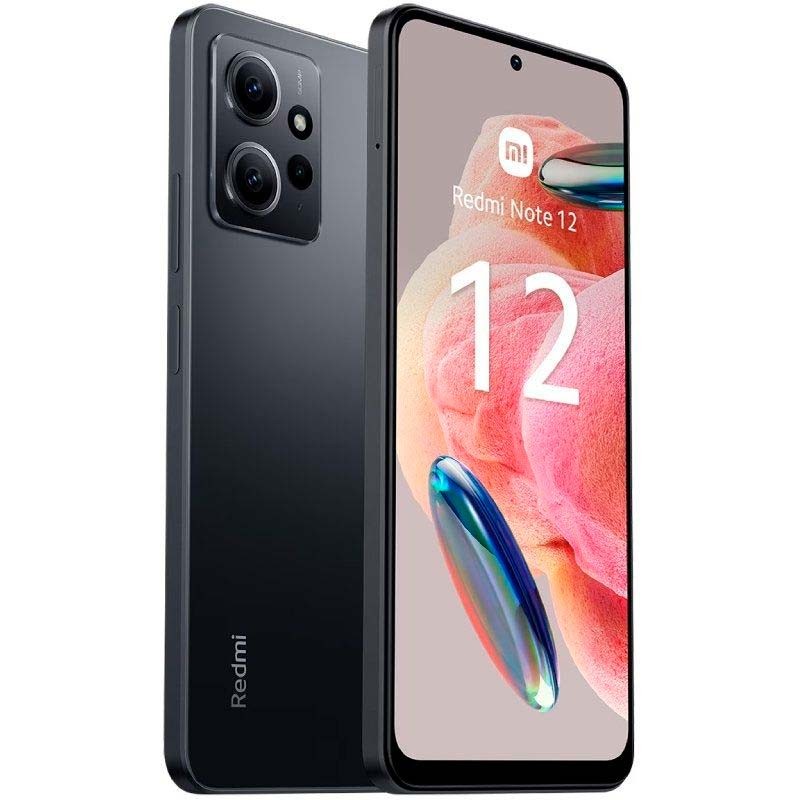
The Xiaomi Redmi Note 12 4G (hardware codename: tapas) is an Android smartphone released in March 2023, built on Qualcomm's Qualcomm Snapdragon 685 (6nm TSMC) processor. Xiaomi distributes it across three primary regional branches — Global, India, and Turkey — each with customized modem calibrations and local RF band profiles.
A closely related sibling model, codename topaz, includes dedicated NFC hardware and runs separate firmware. The two branches are not interchangeable. Confirm your device codename by running "fastboot getvar product" before downloading any packages.
Which Flash Mode Should You Use?
Mi Flash Tool (Fastboot ROM)
The primary flashing method for the Redmi Note 12 4G. Mi Flash Tool interfaces with Qualcomm's Fastboot protocol to execute the flash_all.bat script, writing all partition images — boot, modem, super, and vendor — in a single automated pass. Requires an unlocked bootloader and erases all internal userdata.
Manual Fastboot CLI Commands
Execute individual fastboot flash commands directly from Android SDK Platform-Tools. Useful for surgical repair tasks such as reflashing boot or recovery partitions without formatting userdata.
Qualcomm EDL 9008 Mode (Emergency)
The Snapdragon 685 supports Emergency Download (EDL) mode through motherboard testpoints, used when the device will not power on or reach Fastboot. Xiaomi requires authenticated Mi service account credentials to execute raw firehose writes.
What You Need Before Flashing
Download and install Mi Flash Tool 20200314 or newer on a 64-bit Windows PC. Ensure official Qualcomm USB QDLoader drivers and Android Platform-Tools are installed.
Enable OEM Unlocking and USB Debugging in Developer Options, bind your Mi Account under Mi Unlock status, and complete the unlock with the official Mi Unlock tool.
Download the Fastboot .tgz package matching your hardware variant: VMTMIXM for Global, VMTINXM for India, or VMTTRXM for Turkey. Decompress twice with 7-Zip.
Use a reliable USB-C data cable connected directly to a rear motherboard USB 2.0 port to prevent communication drops during sparse image flashing.
Ensure the 5,000 mAh battery has at least 50% charge to prevent unexpected shutdowns while writing critical boot and system partitions.
Fastboot flashing via flash_all.bat completely wipes internal UFS storage. Back up all photos, contacts, and personal data to cloud or PC before proceeding.
How to Flash the Xiaomi Redmi Note 12 4G — Quick Overview
5-step quick reference for the Xiaomi Redmi Note 12 4G. Need visuals or troubleshooting help? The full Mi Flash Tool guide covers everything in detail.
-
Unlock bootloader with Mi Unlock
-
Decompress Fastboot TGZ archive twice
-
Enter Fastboot mode
-
Configure Mi Flash Tool with clean all
-
Flash and reboot to HyperOS
Firmware Archive Structure for SM6225
Xiaomi packages the Redmi Note 12 4G firmware as regional Fastboot ROM (.tgz) archives. Once decompressing is complete, the folder you point Mi Flash Tool at contains:
flash_all.bat
Xiaomi packages Fastboot firmware as a .tgz archive. After decompressing twice using 7-Zip, the root folder contains flash_all.bat (clean flash), flash_all_except_storage.bat (preserves user data), and flash_all_lock.bat (flashes and relocks bootloader). Technicians recommend selecting "clean all" (flash_all.bat) for unbricking and update recovery.
The tapas board ships across three primary regional branches — Global (VMTMIXM, model 23021RAAEG), India (VMTINXM, model 23027RAD4I), and Turkey (VMTTRXM). A distinct NFC-equipped sibling model, codename topaz (23021RAA2Y), has its own separate firmware channel and must not be flashed using tapas packages despite identical Snapdragon 685 processors.
Inside the extracted Fastboot folder you will find flash_all.bat for Windows and flash_all.sh for Linux/Mac at the root level, alongside an images directory holding individual partition files. Always point Mi Flash Tool's Select field at this root folder — never the images subfolder.
Xiaomi Redmi Note 12 4G Firmware Versions
Official stock HyperOS 2.0 Fastboot ROM releases for the Xiaomi Redmi Note 12 4G. Shows 1 verified build per hardware model variant. For recovery OTA updates and custom recoveries, visit the master archive.
| Version | Region | Android Version | Size | MD5 | Download |
|---|---|---|---|---|---|
OS2.0.209.0.VMTMIXM |
Global (MI) — HyperOS 2.0 (Android 15.0) | Android 15.0, Sep 2026 | 7.2 GB | — | ⬇️ Download |
OS2.0.205.0.VMTINXM |
India (IN) — HyperOS 2.0 (Android 15.0) | Android 15.0, Aug 2026 | 6.1 GB | — | ⬇️ Download |
OS2.0.205.0.VMTTRXM |
Turkey (TR) — HyperOS 2.0 (Android 15.0) | Android 15.0, Aug 2026 | 6.6 GB | — | ⬇️ Download |
Showing 1 tested HyperOS 2.0 Fastboot build per distinct model variant. Browse full archive with recovery OTAs, TWRP, and OrangeFox on AndroidFirmwareFile.com →
Xiaomi Redmi Note 12 4G — Important Notes
Always confirm that your bootloader is unlocked before attempting to flash via Fastboot. If the bootloader is locked, Mi Flash will fail with FAILED (remote: "Command not allowed"). You can verify your bootloader status by opening a terminal in Fastboot mode and typing fastboot getvar unlocked.
Because tapas uses a Qualcomm Snapdragon 685 processor, emergency hardware unbricking requires Qualcomm EDL 9008 mode. However, Xiaomi requires server authorization tokens for raw firehose writes, so standard DIY unbricking must be performed through Fastboot mode with an unlocked bootloader.
Troubleshooting Redmi Note 12 4G Mi Flash & Fastboot Errors
FAILED (remote: "Check antirollback ver verify failed")
This occurs when attempting to downgrade from HyperOS 2.0 (Android 15) to earlier MIUI 14 or HyperOS 1.0 builds with an older Anti-Rollback (ARB) index. Xiaomi locks the bootloader rollback index in electronic fuses (eFuses). Never force-flash an older build through modified scripts, as a rollback index mismatch will permanently brick the bootloader.
error: Not catch checkpoint ($fastboot -s .* reboot)
Mi Flash Tool throws this message when its default checkpoint pattern does not match the reboot string returned by modern fastboot binaries. If the progress bar is green and the status shows "success", the flash completed cleanly and the notification can be safely ignored. If the phone did not reboot automatically, type "fastboot reboot" manually in a command window.
FAILED (remote: "Partition table doesn't exist") or Sahara Protocol Drop
This error indicates a USB packet dropout during partition table initialization, common when using third-party USB hubs or USB 3.2 Gen 2 ports. Switch to a certified USB 2.0 port directly on the motherboard, use the short white Xiaomi factory data cable, and avoid running other heavy USB data transfers simultaneously.
The system displays "NV Data is Corrupted" on first boot
This points to a corrupted or mismatched modem non-volatile (NV) partition, almost always caused by flashing a regional firmware branch that does not match the phone's factory hardware (e.g. flashing Indian VMTINXM on Global 23021RAAEG hardware). Reflash the exact regional Fastboot ROM your phone shipped with using Mi Flash Tool with "clean all" selected.
For the full firmware error database and solutions: Fastboot Error Directory →
Frequently Asked Questions — Xiaomi Redmi Note 12 4G
The super.img dynamic partition on HyperOS 2.0 is over 4.5 GB unpacked. If you connect to a front-panel USB 3.0 port or run an outdated 32-bit build of Mi Flash, the USB transfer buffer can overflow, causing the flash process to stall. Technicians recommend using Mi Flash 20200314 or newer, connecting the phone to a rear motherboard USB 2.0 port, and ensuring the extracted firmware path has no spaces or special characters (such as C:\tapas_fw\).
Windows 11 frequently misidentifies the Fastboot interface on AMD-based PCs, showing the phone with a yellow warning triangle in Device Manager. Open Device Manager, right-click the flagged device, choose "Update driver" → "Browse my computer" → "Let me pick from a list", and manually select "Android Device" followed by "Android Bootloader Interface". Once installed, running fastboot devices in a command terminal will return the device serial number immediately.
Although the Snapdragon 685 board can be placed into Emergency Download (EDL 9008) mode by bridging the two gold testpoints beneath the motherboard shield, Xiaomi protects this platform with cryptographic server authentication. Flashing raw firehose programmer files through QFIL or open-source EDL utilities fails without an authenticated Xiaomi service account token. If Fastboot mode is inaccessible, recovery requires an authorized Xiaomi service center technician.
If Mi Flash completes with a green success message but the phone boots directly back into Fastboot mode rather than HyperOS, the active partition slot may be mismatched or userdata formatting did not finalize. Disconnect the USB cable, hold Volume Up and Power to enter stock recovery, and choose "Wipe Data". If the phone still reboots to Fastboot, open a command prompt and run "fastboot set_active a" followed by "fastboot reboot".
Ready to Flash?
Follow the full step-by-step Mi Flash Tool guide with interactive progress tracking, prerequisite checklist, and complete troubleshooting.