

OST Tool – How to Flash Nokia / HMD Firmware
Learn how to use OST Tool to flash stock Nokia firmware on HMD Global devices. This guide covers Nokia USB driver setup, MLF/NB0 firmware loading, flash operation selection, and how to fix common errors including device detection failures and product mismatches.
Pre-Flight Checklist
Complete ALL items before proceeding. Skipping any step increases the risk of bricking your device.
Guide Steps
Install the Nokia USB drivers package first, then install OST Tool. Run both installers as Administrator.
After installation, do not connect your Nokia yet.
Open OST Tool. In the Product panel:
- Click Browse next to the firmware field.
- Navigate to your Nokia firmware file (
.mlfor.nb0). - OST Tool reads the firmware header and displays the product name and variant — confirm it matches your Nokia model.
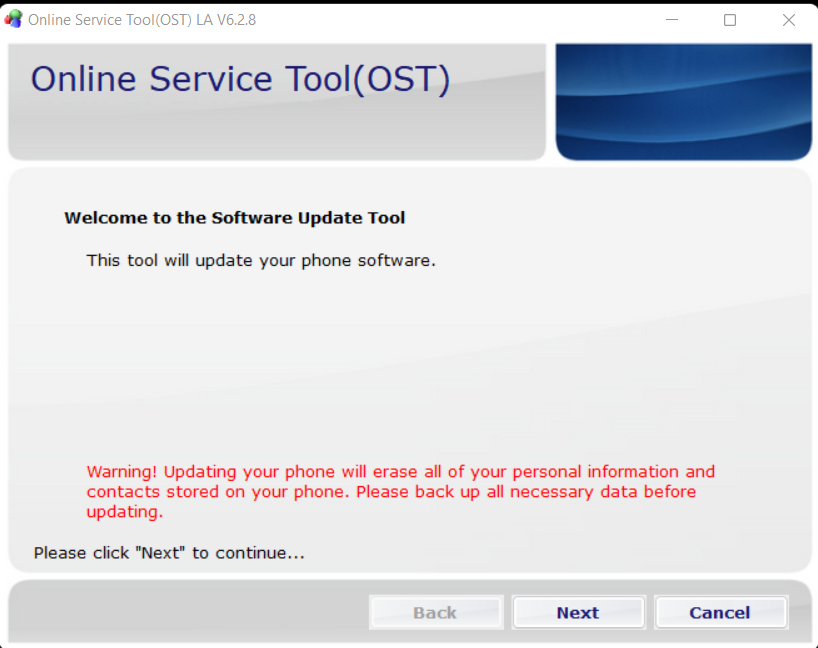
Power off your Nokia completely. Then connect it to the PC via USB. OST Tool detects the device automatically and shows the connection in the Connections panel.
For some Nokia models, you may need to hold Volume Down while connecting to enter flash mode.
In OST Tool's operation panel, select the flash type:
- Flash — Flashes firmware without wiping userdata (upgrade mode).
- Erase and Flash — Full wipe and firmware restoration. Recommended for bootloop or brick recovery.
- Erase — Wipes the device only without flashing (use with caution).
For recovery purposes, always choose Erase and Flash.
Click Flash. OST Tool begins writing the firmware. Progress bars and partition status update in real time.
Total time: typically 5–15 minutes for a full Nokia firmware flash.
When complete, OST Tool shows Flash OK and the device reboots.
The Nokia boots into the freshly flashed stock Android. First boot takes 2–5 minutes as the OS initializes.
Complete the setup wizard and sign in to your Google account to restore apps and data from backup.
Verify the firmware version under Settings → About Phone → Android version / Build number.
Congratulations! Flash Successful!
You've successfully completed all steps. Your device should now be running the new firmware. If it's booting normally — you're done! Check the troubleshooting section below if you encounter any issues.
Troubleshooting & FAQ
Common errors and their solutions. Read this before asking for help.
Reinstall Nokia USB drivers. Confirm the Nokia is fully powered off before connecting. Try a different USB cable and port (use USB 2.0). Some Nokia models require Volume Down held during connection to enter service mode.
Nokia service firmware is distributed through Nokia's authorized service network. Community sites like NKIAFILES and similar Nokia enthusiast forums sometimes host firmware packages. Always verify the model code (TA-XXXX) matches exactly before downloading.
The firmware file is for a different Nokia model variant. Nokia TA codes are variant-specific — for example, TA-1053 (global) and TA-1054 (carrier) are different products. Use firmware that exactly matches your Nokia's TA code from Settings → About Phone → Model.
OST Tool can flash any valid Nokia firmware including newer Android versions, as long as the firmware package is available for your model. However, official OTA updates from Nokia are the safest upgrade path. OST Tool is primarily for recovery when OTA is not possible.
HMD DeviceKit is Nokia/HMD Global's newer service tool, replacing OST Tool for devices launched from around 2022 onwards (Nokia C, G, X, T series and HMD-branded devices like HMD Skyline, Fusion, and Pulse). The latest HMD DeviceKit version is v2.0.23.10. If your Nokia model is not recognised by OST Tool, or your firmware package does not include .mlf/.nb0 files, download HMD DeviceKit from the HMD Global service resources. OST Tool remains the correct tool for older Nokia TA-series devices with .mlf/.nb0 firmware.
Prioritize our guides in your Google search results.
No comments yet. Be the first to share your experience with this guide!