

Before you flash: Flashing firmware will erase all data on your device. Back up contacts, photos, and apps before proceeding. FlashGuideHub is not responsible for any damage caused by following this guide.
About the Gionee Marathon M5 Enjoy
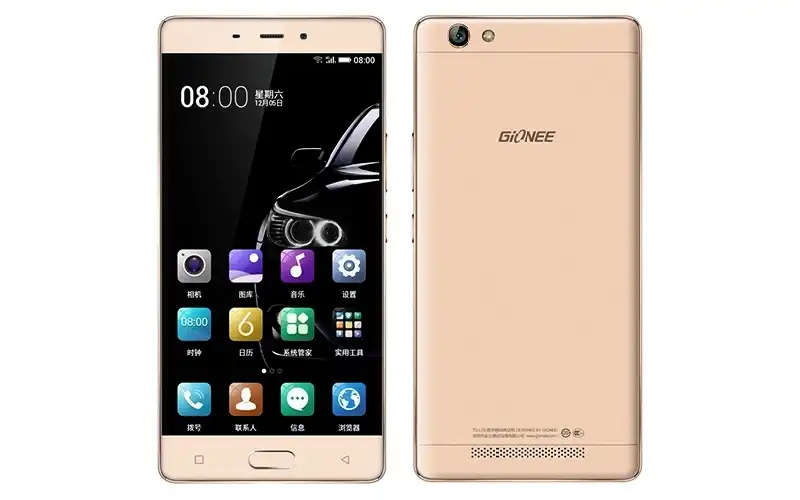
The Gionee Marathon M5 Enjoy was released in December 2015, built on the MediaTek MT6735 platform. Featuring a 5.5-inch HD IPS display, a front-mounted physical fingerprint sensor, an 8 MP primary camera with autofocus, and a generous 5000 mAh battery, the device offers dependable everyday performance.
Flashing official factory firmware using SmartPhone Flash Tool (SP Flash Tool) unbricks dead handsets, clears persistent bootloops, and restores factory Amigo OS performance. Follow the verified driver preparation and procedural walkthrough below to service your device safely.
Which Flash Mode Should You Use?
MediaTek Preloader / BROM Flashing Mode
Official firmware deployment mode. Writes partition images directly to eMMC flash memory via Preloader handshake without requiring fastboot unlocking.
Stock Android Recovery Mode
Factory recovery interface for performing data wipes, cache clearance, and ADB sideload packages.
What You Need Before Flashing
Maintain at least 40% battery charge to ensure stable voltage during partition programming.
Connect via an authentic microUSB cable directly to a rear USB 2.0 port on the computer motherboard.
Install MediaTek USB VCOM and Preloader drivers to ensure proper SP Flash Tool communication.
Always choose "Download Only" in SP Flash Tool to protect factory NVRAM baseband calibrations.
How to Flash the Gionee Marathon M5 Enjoy — Quick Overview
A condensed step-by-step summary specific to the Gionee Marathon M5 Enjoy. Follow the full SP Flash Tool guide for screenshots, an interactive progress checklist, and complete troubleshooting.
-
Download and extract scatter package
-
Install MediaTek USB VCOM drivers
-
Launch SP Flash Tool & load scatter file
-
Uncheck preloader partition
-
Click Download & connect powered-off phone
Firmware Package for MT6735
Official scatter firmware packages for the Gionee Marathon M5 Enjoy (GN5002) contain partition binaries (boot.img, system.img, recovery.img, lk.bin, and logo.bin) structured through MT6735_Android_scatter.txt. When loaded in SmartPhone Flash Tool (SP Flash Tool), these images are flashed directly to the MediaTek MT6735 eMMC storage controller via Preloader USB VCOM.
MT6735_Android_scatter.txt
MediaTek scatter firmware packages organize raw system images alongside a linear partition map. The MT6735_Android_scatter.txt file instructs SP Flash Tool on exact sector boundaries for eMMC flashing.
The Gionee Marathon M5 Enjoy (GN5002) is powered by the MediaTek MT6735 quad-core processor with 3GB of RAM, 16GB of eMMC storage, a front physical fingerprint scanner, and a 5000 mAh battery.
Always confirm that your device model is "GN5002" before flashing. Never flash packages intended for the sibling GN5001 (M5 Lite) or GN5003 (M6 Mini), as display controller and camera driver binaries differ.
Gionee Marathon M5 Enjoy Firmware Versions
Official factory scatter firmware package for Gionee Marathon M5 Enjoy GN5002 (MT6735). Includes partition images and MT6735_Android_scatter.txt.
| Version | Region | Android Version | Size | MD5 | Download |
|---|---|---|---|---|---|
SV1.1 (2017.10.11) |
China / Global Stock | Android 5.1 (Amigo OS 3.1) | 1.34 GB | e05852db63abc2759006f3a0bcfda5f9 |
⬇️ Download |
Looking for full device specifications and hardware taxonomy? View complete Gionee Marathon M5 Enjoy (GN5002) hardware specifications on AndroidFirmwareFile.com →
Gionee Marathon M5 Enjoy — Important Notes
Flashing official scatter firmware via SP Flash Tool repairs bootloop cycles, resolves software crashes, and unbricks dead devices.
If your device fails to connect, turn off the phone, remove and reinsert the battery (or hold Power for 10 seconds), open SP Flash Tool, click Download, hold Volume Down, and connect the microUSB cable to a rear USB 2.0 port.
Troubleshooting Gionee Marathon M5 Enjoy (GN5002) Flashing Issues
Handshake Timeout: BROM ERROR: S_BROM_DOWNLOAD_FAIL (2004) / USB Drop
Observed when connecting the Gionee Marathon M5 Enjoy (GN5002) through modern USB 3.0/3.1 controllers on Windows 10 or 11. The MediaTek MT6735 BootROM handshake window lasts only 2 to 3 seconds before the device drops out and reboots. Community technicians resolve this by utilizing an authentic USB 2.0 rear motherboard port, reinstalling signed MediaTek MTK VCOM drivers, and holding Volume Down during cable insertion.
Scatter Integrity: BROM ERROR: S_CHKSUM_ERROR (1041) on Load
Occurs when SP Flash Tool detects corrupted or mismatched checksum hashes inside the firmware directory. This is typically triggered by an incomplete archive download or unzipping with built-in Windows Zip instead of 7-Zip. Repair forum members recommend re-extracting with 7-Zip to a clean root folder or deleting Checksum.ini if manual scatter verification is verified.
Hardware Quirk: Display Panel Driver Black Screen Post-Flash (GN5001 vs GN5002 Cross-Flash)
Frequently reported when technicians mistakenly flash firmware from the 5.0-inch GN5001 (M5 Lite) onto the 5.5-inch GN5002 (M5 Enjoy). While both handsets share the MT6735 platform, the LCD panel driver ICs and touch controller firmware differ. Cross-flashing results in an unresponsive black screen while the phone vibrates and boots. Flashing the verified GN5002 SV1.1 factory package restores native display initialization.
Encountering handshake dropouts or scatter load errors on the Gionee Marathon M5 Enjoy (GN5002)? Review our workshop repair notes below. Troubleshooting & Known Quirks →
Frequently Asked Questions — Gionee Marathon M5 Enjoy
Turn off the phone completely. In SP Flash Tool, click "Download" first, then insert the microUSB cable while holding the Volume Down button (or Volume Up on certain production batches) for 3 seconds. Once the red progress bar appears at the bottom of the tool, release the button to allow the Preloader handshake to proceed.
This indicates a handshake timing window timeout between the MediaTek MT6735 boot ROM and Windows host controllers, commonly triggered by modern USB 3.0/3.1 ports. Bench technicians resolve this by plugging the cable directly into a native rear USB 2.0 port, ensuring signed MediaTek Preloader VCOM drivers are installed, and temporarily disabling Windows Driver Signature Enforcement.
Selecting "Format All + Download" wipes the entire physical flash memory, including the protected protect_f, protect_s, and nvram partitions where unique baseband calibration and IMEI numbers reside. Doing so causes "Invalid IMEI" and permanent cellular loss. Always select "Download Only" (or "Firmware Upgrade" if partition geometries changed).
Disconnect the device, press and hold the Power button for 12 seconds until the screen turns black, and wait 5 seconds. Open SP Flash Tool, load MT6735_Android_scatter.txt, uncheck the "preloader" partition to safeguard the bootloader block, click "Download", and connect the powered-off phone while holding Volume Down.
Ready to Flash?
Follow the full step-by-step SP Flash Tool guide with interactive progress tracking, prerequisite checklist, and complete troubleshooting.