

Before you flash: Flashing firmware will erase all data on your device. Back up contacts, photos, and apps before proceeding. FlashGuideHub is not responsible for any damage caused by following this guide.
About the Huawei Ascend GX1
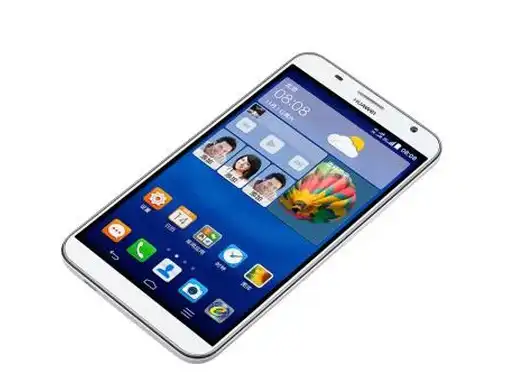
The Huawei Ascend GX1 was released in December 2014. It is a 6.0-inch smartphone powered by the Qualcomm Snapdragon 410 (MSM8916) processor, manufactured in dedicated China Unicom (SC-UL10) and China Telecom (SC-CL00) editions.
Flashing Qualcomm emergency XML firmware restores devices from hard bricks, fixes persistent boot loops, and writes clean factory board software. Follow the step-by-step QFIL instructions below to restore your phone safely.
Which Flash Mode Should You Use?
QFIL / QPST Emergency Download (EDL 9008 Mode)
Factory unbrick and board software servicing workflow for Qualcomm Snapdragon 410 using rawprogram0.xml.
What You Need Before Flashing
QFIL and Qualcomm drivers require a Windows PC. Ensure driver signature enforcement is disabled if installing legacy drivers.
Download and extract the package for your exact model (SC-UL10 or SC-CL00) to access rawprogram0.xml.
Use a verified data transfer cable connected directly to a rear motherboard USB 2.0 port on your computer.
The phone will not charge while connected in EDL 9008 mode. Ensure sufficient charge before writing partitions.
Qualcomm rawprogram XML flashing erases all data, apps, and storage partitions. Back up your files if possible.
How to Flash the Huawei Ascend GX1 — Quick Overview
These 5 steps are tailored to the Huawei Ascend GX1 (Snapdragon 410). For screenshots, an interactive checklist, and troubleshooting, open the full QFIL guide.
-
Download and extract firmware archive
-
Install Qualcomm QDLoader 9008 drivers
-
Configure QFIL in Flat Build mode
-
Put phone into Qualcomm EDL mode
-
Execute Download and wait for success
Firmware Package for Qualcomm Snapdragon 410
Firmware for the Qualcomm-based Huawei Ascend GX1 is deployed in the rawprogram XML structure rather than standard Huawei UPDATE.APP containers. The rawprogram0.xml script indexes all raw partition image files (sbl1.mbn, aboot.mbn, rpm.mbn, tz.mbn, boot.img, recovery.img, and system.img) and maps them directly to physical sectors on the eMMC chip via Qualcomm Firehose protocol.
rawprogram0.xml / patch0.xml
Load rawprogram0.xml and patch0.xml into QFIL under Flat Build. The tool automatically reads the XML sector map and flashes each partition binary directly to eMMC flash.
Carrier partition warning: Do not cross-flash the SC-UL10 and SC-CL00 packages. The SC-UL10 package contains GSM/WCDMA modem images, while the SC-CL00 board software package includes China Telecom CDMA baseband binaries. Flashing the wrong variant will erase or corrupt the non-volatile modem partitions.
Huawei Ascend GX1 Firmware Versions
Official stock emergency firmware for the Huawei Ascend GX1. Verify your exact carrier model code (SC-UL10 or SC-CL00) before downloading.
| Version | Region | Android Version | Size | MD5 | Download |
|---|---|---|---|---|---|
V100R001C00B135 (QPST) |
China / Unicom (SC-UL10) | Android 4.4 (EMUI 3.0) | 658 MB | — | ⬇️ Download |
V100R001C92B364 (Board Software) |
China / Telecom (SC-CL00) | Android 4.4 (EMUI 3.1) | 963 MB | — | ⬇️ Download |
Need additional technical specifications, board revision notes, or archive builds? View the complete Huawei Ascend GX1 archive on AndroidFirmwareFile.com →
Huawei Ascend GX1 — Important Notes
The Huawei Ascend GX1 is equipped with a non-removable 3500 mAh battery. Because Qualcomm EDL mode consumes battery during intensive partition writes and does not support USB charging, make sure the battery is charged to at least 40% before starting. If the phone is completely dead, let it charge from a wall adapter for at least 30 minutes before forcing EDL mode.
Common Errors on the Huawei Ascend GX1
QFIL: Download Fail: FireHose Fail FHLoader Fail
Communication with the programmer MBN failed during partition writing. Disconnect the USB cable, restart QFIL as administrator, and verify that the programmer path points to the correct 8916 firehose binary.
QHSUSB_BULK detected instead of QDLoader 9008
Windows has identified the emergency download hardware but is missing the certified Qualcomm QDLoader driver. Install the Qualcomm HS-USB driver installer to assign a valid COM port.
Phone reboots repeatedly on Huawei logo after flashing
Unplug the phone, hold Volume Up + Power to boot into stock recovery, and execute "Wipe data / factory reset" and "Wipe cache partition" to clear legacy user data.
For common Qualcomm Sahara and Firehose QFIL error solutions: Qualcomm EDL Flashing Error Directory →
Frequently Asked Questions — Huawei Ascend GX1
Turn the phone off completely. Press and hold Volume Up and Volume Down at the same time, then plug in the USB cable connected to your PC. The screen will remain black, and Windows Device Manager will show Qualcomm HS-USB QDLoader 9008 under Ports (COM & LPT).
Sahara errors typically happen when the USB handshake times out or the programmer file does not match the chip revision. Unplug the phone, hold the Power button for 15 seconds to exit the hung state, re-enter EDL mode, and connect to a USB 2.0 port on the back of your computer.
Yes. Qualcomm EDL 9008 operates at the primary bootloader hardware layer embedded directly within the Snapdragon 410 SoC. It communicates with the PC even if the internal eMMC memory is completely erased or corrupted.
Click the "Select Port" button at the top of QFIL. If no port is listed, open Windows Device Manager. If you see a yellow exclamation mark on "QHSUSB_BULK", your Qualcomm QDLoader 9008 driver is missing or requires disabling driver signature enforcement.
Ready to Flash?
Follow the full step-by-step QFIL guide with interactive progress tracking, prerequisite checklist, and complete troubleshooting.