

Before you flash: Flashing firmware will erase all data on your device. Back up contacts, photos, and apps before proceeding. FlashGuideHub is not responsible for any damage caused by following this guide.
About the Xiaomi Redmi 4X
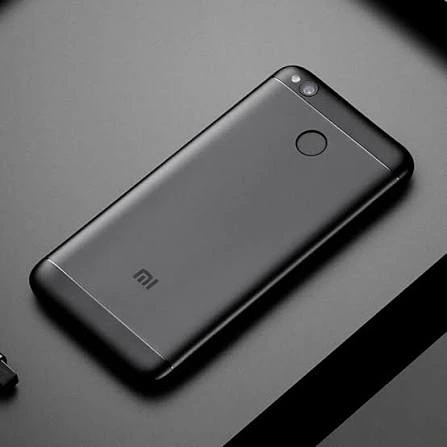
The Xiaomi Redmi 4X was released in May 2017, powered by the Qualcomm Snapdragon 435 MSM8940 (28nm LP, 64-bit Octa-core 1.4 GHz Cortex-A53) processor. Featuring a 5.0-inch 720p HD display, a 13 MP rear camera, a rear fingerprint scanner, and an enduring 4100 mAh battery, the phone remains one of Xiaomi's classic compact handsets.
Flashing official factory firmware using Xiaomi Mi Flash Tool repairs soft-bricked devices, recovers corrupted bootloader blocks, and restores original MIUI performance. Follow the verified driver preparation and procedural steps below to flash your device safely.
Which Flash Mode Should You Use?
Fastboot Mode (Bootloader Flashing)
Official flashing mode for bootloader-unlocked handsets. Deploys full partition tables via Mi Flash Tool or flash_all.bat batch scripts.
Qualcomm HS-USB QDLoader 9008 (EDL Mode)
Emergency download mode accessed via motherboard test points. Communicates directly with the Snapdragon 435 boot ROM without requiring an unlocked bootloader.
Stock Android Recovery Mode
Stock recovery interface for performing factory data wipes or clearing cache partitions.
What You Need Before Flashing
A PC running 64-bit Windows with Mi Flash Tool and official Qualcomm USB drivers installed.
Download and extract the official V11.0.2.0.NAMMIXM archive twice with 7-Zip until flash_all.bat is visible.
Ensure the 4100mAh battery has at least 50% charge to ensure stable power delivery throughout the flashing process.
Use a quality microUSB data cable connected directly to a rear USB 2.0 port on the computer motherboard.
In Mi Flash Tool, select "clean all" at the bottom right. Never select "clean all and lock" on regional conversions.
How to Flash the Xiaomi Redmi 4X — Quick Overview
A condensed step-by-step summary specific to the Xiaomi Redmi 4X. Follow the full Mi Flash Tool guide for screenshots, an interactive progress checklist, and complete troubleshooting.
-
Unlock bootloader & extract Fastboot TGZ package
-
Install Qualcomm USB Drivers & Mi Flash Tool
-
Boot Redmi 4X into Fastboot Mode
-
Configure Mi Flash Tool & select "clean all"
-
Flash firmware and wait for automatic restart
Fastboot Rawprogram XML & Firmware Package for Snapdragon 435
Official Fastboot firmware packages for the Xiaomi Redmi 4X (santoni) contain raw partition images (boot.img, system.img, recovery.img, cust.img, and modem) configured via flash_all.bat, rawprogram0.xml, and patch0.xml. When loaded in Mi Flash Tool, these scripts flash partition images directly into the Qualcomm Snapdragon 435 eMMC storage controller.
rawprogram0.xml
Official factory Fastboot firmware for the Xiaomi Redmi 4X utilizes rawprogram0.xml and patch0.xml executed through flash_all.bat. In Mi Flash Tool, select the root extracted folder containing these scripts.
The Redmi 4X (board codename santoni) is powered by the Qualcomm Snapdragon 435 (MSM8940) octa-core processor with 2GB/3GB/4GB RAM, 16GB/32GB/64GB eMMC 5.1 storage, and a 4100mAh battery.
Always confirm your hardware codename is "santoni" prior to flashing. Firmware designed for "prada" (Redmi 4 standard, Snapdragon 430) or "markw" (Redmi 4 Prime, Snapdragon 625) will fail hardware verification and damage partition tables.
Xiaomi Redmi 4X Firmware Versions
Tested stock firmware package for the confirmed hardware variant of the Xiaomi Redmi 4X. Always confirm your model codename is "santoni" before flashing.
| Version | Region | Android Version | Size | MD5 | Download |
|---|---|---|---|---|---|
V11.0.2.0.NAMMIXM (20191107.0000.00) |
Global Stable (MI) — Multilingual | Android 7.1.2 (MIUI 11.0) | 1.78 GB | 99c087db0295135d3f8230ee9093ecbd |
⬇️ Download |
This device family includes 5 verified packages across Global, China, Xiaomi.eu, and custom recoveries (TWRP & PBRP). Browse the complete 5-package archive on AndroidFirmwareFile.com →
Xiaomi Redmi 4X — Important Notes
Flashing official Fastboot TGZ firmware via Xiaomi Mi Flash Tool repairs corrupted operating system partitions, resolves persistent bootloops, and restores factory device security.
If your device is unbootable, does not enter Fastboot mode, or fails to respond to physical buttons, open the rear housing, disconnect the battery ribbon, and short the two gold EDL test points with metal tweezers while inserting the microUSB cable to force Qualcomm HS-USB QDLoader 9008 mode for factory unbrick flashing.
Troubleshooting Xiaomi Redmi 4X (santoni) Mi Flash & Fastboot Errors
Biometric Desync: Fingerprint scanner unresponsive or missing from settings menu (Goodix vs FPC sensor & persist conflict)
Redmi 4X was manufactured with two distinct rear fingerprint sensor hardware modules: FPC (Fingerprints Cards) and Goodix. When flashing between stock and custom ROMs or after partial partition flashing, the calibration tables stored inside the persist partition (/persist/data/gxfp/) can desynchronize, causing the biometric daemon to crash or hide fingerprint options from MIUI settings. Community repair discussions indicate this is resolved by performing a full Fastboot flash with flash_all.bat or clearing stale Goodix data caches from the persist directory while maintaining partition integrity.
Display Touch Freeze: Touchscreen unresponsive or black screen after resume on replacement panels (Tianma vs EBBG touch IC driver mismatch)
Xiaomi sourced LCD assemblies for santoni across multiple display suppliers, primarily Tianma and EBBG with differing touch controller ICs. When returning to stock or updating firmware after third-party screen replacements, mismatched kernel display device tree blobs (DTB) can cause complete touch unresponsiveness or sleep-wake display freeze bugs. Repair forum members recommend verifying that the official Fastboot package contains the latest stable MIUI 11 kernel binaries or installing a custom kernel with comprehensive multi-panel driver support via TWRP.
Sahara Handshake Timeout / Error 0x80004005 in Mi Flash Tool during EDL 9008 testpoint unbrick
When unbricking a dead handset via motherboard test points, Mi Flash Tool communicates directly with the Qualcomm Snapdragon 435 boot ROM via Sahara protocol. If Windows assigns an unstable driver or if the device is connected through a USB 3.0/3.1 port, the Sahara handshake fails with error 0x80004005. Technicians suggest uninstalling conflicting generic COM drivers, installing signed Qualcomm QDLoader 9008 drivers with driver signature enforcement disabled, and using a high-quality USB 2.0 cable on a rear motherboard port.
For in-depth Xiaomi Fastboot error explanations, EDL testpoint walkthroughs, and Sahara resolution steps: Mi Flash Tool Error Directory →
Frequently Asked Questions — Xiaomi Redmi 4X
No. Although they share the Redmi 4 family naming, the China standard Redmi 4 (prada) utilizes a Snapdragon 430, while the Redmi 4 Prime (markw) uses a Snapdragon 625. Flashing packages across these platforms will corrupt the primary partition table and cause an immediate hard brick.
If the phone is completely unresponsive or stuck in a black-screen boot loop, disconnect the battery ribbon and short the two gold EDL test points near the battery terminal using metal tweezers while inserting the microUSB cable. This initiates Qualcomm HS-USB QDLoader 9008 mode for factory flashing via Mi Flash.
This happens when a user flashes Global firmware onto a domestic China hardware edition (MAE138) with the "clean all and lock" option selected. The bootloader rejects mismatched regional signature certificates. Always select "clean all" (flash_all.bat) to leave the bootloader unlocked.
This occurs during Qualcomm EDL 9008 mode when USB data packets drop. Technicians advise connecting the microUSB cable directly to a rear motherboard USB 2.0 port, moving the firmware directory to a short path without spaces (such as C:\santoni), and launching Mi Flash as administrator.
Ready to Flash?
Follow the full step-by-step Mi Flash Tool guide with interactive progress tracking, prerequisite checklist, and complete troubleshooting.